Why It’s Different
Your Care Crew
Everyone wants to help. Nobody knows what to do. Until now.

Who it’s for
Sound familiar?
You, if you live closest, so somehow every appointment, refill and emergency lands on you.
You, if you’ve ever thought, “It would honestly be easier to just do it myself.”
You, if three people offered to help and you still ended up driving.
You, if you spend more time coordinating the helpers than being helped.
The problem
Most families don’t lack people who care. They lack a way to share caregiving.
So one person becomes the family dispatcher. The one remembering the refill, checking who’s driving, texting the group again because nobody answered, and following up on every “I’ve got it.”
Meanwhile, everyone else thinks things are handled.
You’re exhausted. They feel out of the loop. And somehow, you’re still the one making sure nothing gets missed.
What you can do
Share caregiving: give everyone a way to actually help.
Bring everyone in.
Invite family, friends, neighbors or a paid caregiver to share caregiving. Everyone you invite joins free, and there’s no limit on how many.
Share the to-do list.
Add a task and give it to someone, or leave it as No one yet so anyone can tap I Can Help. When a task is left open, everyone hears about it.
Cover the rides.
Set an appointment to ask the Care Crew for a ride. It shows Needs Ride until someone taps I Can Drive, and the ride shows up in their Tasks so they don’t forget.
Talk in one place.
Care Crew Chat keeps the family conversation together. Private Chat is just you and one other person. No one else, not even the coordinator, can read it.
Stay in the loop without asking.
The bell keeps you up to date: who’s driving, new and moved appointments, medication changes, tasks for you, new journal entries and comments.
Know who’s free when.
Each person can share which days they’re usually available, with a note like “evenings only.”
Hand it off when you need a break.
Taking a Break lets you pick who covers, hands them your tasks and rides, and gives them back to you with one tap when you return.
Keep track of expenses.
With Premium, the Expense Tracker records what was spent and who paid, reads receipts from a photo, and downloads a spreadsheet when it’s time to settle up or do taxes.
Care for up to five people.
Caring for Mom, Dad, Tio Leo, Aunt Sue? Each one gets their own Care Crew, and you switch between them from one login.
How to use it
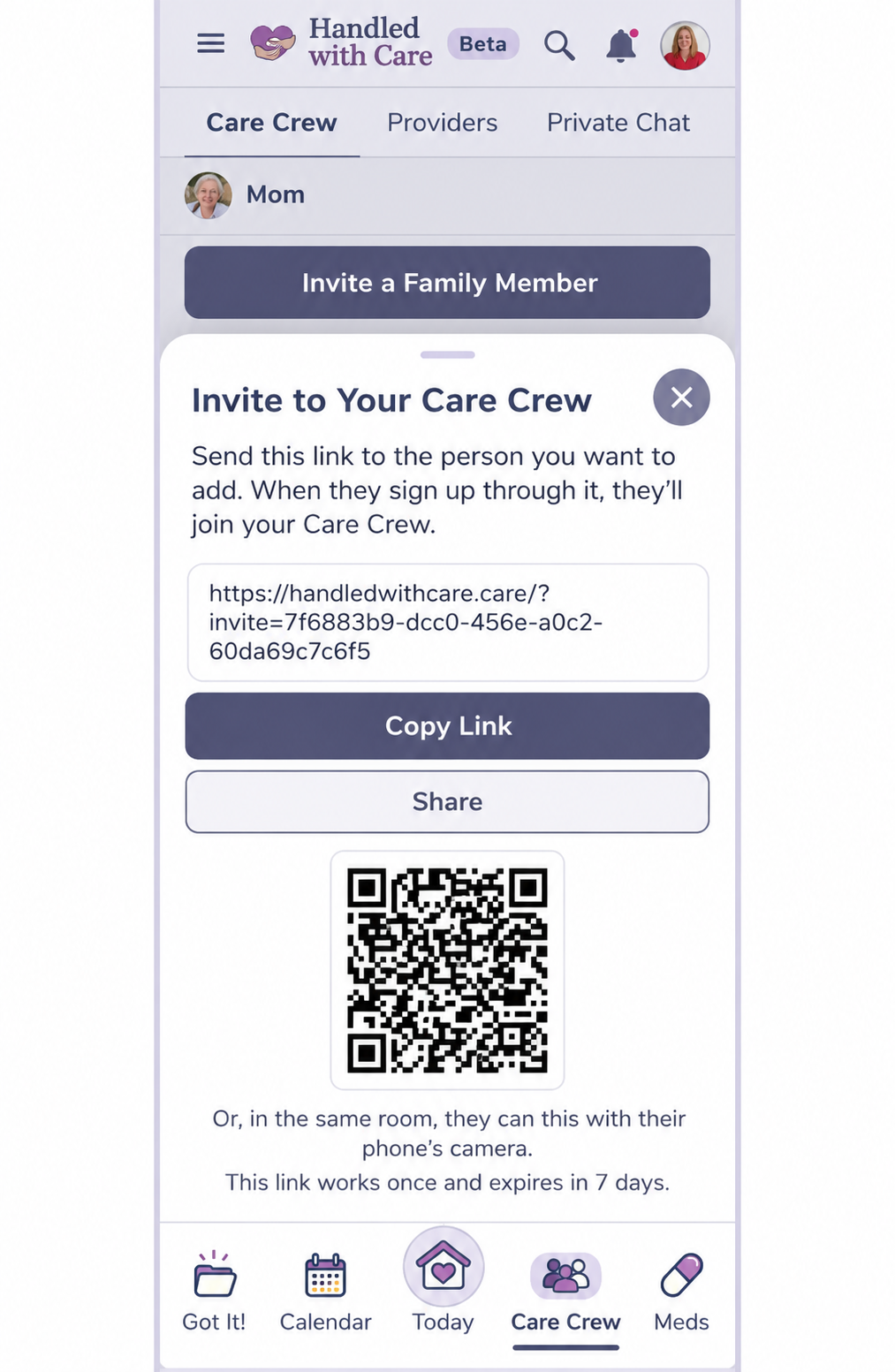
Invite someone and give them something to do.
Tap Care Crew at the bottom of the screen.
Tap Invite a Family Member, then Create Link.
Share the link by text or email, or let them scan the code in person. Each link works once, for 7 days.
When they join, tap the + button, choose Task, and give them something to do. Or leave it as No one yet and let someone tap I Can Help.
How it works with the rest of the app
Nobody has to keep asking what’s going on.
When someone taps I Can Drive, the coordinator and whoever added the appointment are told.
Missed dose alerts go to everyone in the Care Crew who has them turned on, not just one person.
When you take a break, your tasks and rides go to whoever’s covering, and come back when you return.
Everyone sees the same calendar, medications and Got It! documents, so nobody is working from old information.
How it’s different
Group texts and shared calendars weren’t made for caregiving.
They were not built for the sister texting, “Who can take Dad Thursday?” while she is also calling the pharmacy, moving an appointment, and trying to remember who said they would pick up dinner.
Handled with Care was.
It is built for the way caregiving actually works: one person usually becomes the point person, while everyone else helps where they can.
The difference is, now everyone can see what needs to be done, claim it, and know when it’s handled.
Common questions
You might be wondering.
Who can see what?
Everyone in the Care Crew sees the same information about your person. Your check-ins, Private Chat and “Just me” reminders stay private. Read more about privacy and control.
Do the people I invite have to pay?
No. One plan covers the whole Care Crew, and everyone you invite joins free.
Can a paid caregiver or aide join?
Yes. They join with the same link and can do everything other members can.
Who’s in charge?
The coordinator invites people and chooses the plan. There’s one coordinator at a time, and the job can be handed to someone else with Make Coordinator. When the coordinator takes a break, the person covering can invite people and gets their reminders.
Is the Care Crew free?
Inviting people, the bell and switching between people you care for are free on every plan. Adding tasks, appointments and messages is part of Basic and Premium. Everything already there stays visible on Free.
Stop managing the helpers.
Give everyone a place to see what needs doing and pitch in.
Try It for Free