Why It’s Different
Support for You
Everyone asks how Mom is doing. This part asks about you.

Who it’s for
Sound familiar?
You, if you’re the one everybody calls, and nobody calls just to ask how you are.
You, if you’ve cried in the car in the pharmacy parking lot, then gone inside like nothing happened.
You, if Dad keeps asking for the car keys and you have no idea what to say that won’t start a fight.
The problem
Most caregiving apps are built around the person getting care. Handled with Care also pays attention to the person doing the caring.
Because caregivers need support too.
Sometimes you’re so busy taking care of everyone else, you forget to take care of yourself. Sometimes you just need 60 seconds to get your head back together.
Handled with Care includes caregiver support tools too, like Weekly Check-Ins, A Moment for You, outside support resources, and ways to ask someone else to step in when you need help.
What you can do
Caregiver support: a few things in the app are just for you.
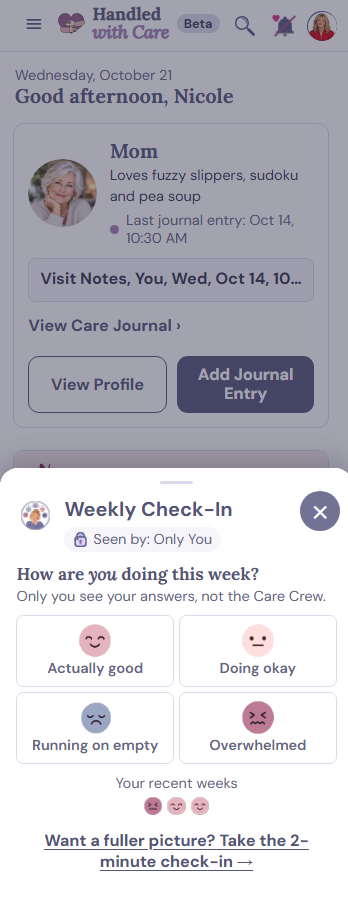
Check in with yourself.
The Weekly Check-In asks one question: how are you really doing? Only you can see it. After two hard weeks, it offers to ask someone in your Care Crew to step in.
Get the fuller picture.
The 2-Minute Check-In helps you see how worn down you are, with things you can do right now. It’s for you only.
Take one minute.
A Moment for You has 30 one-minute resets: breathing, grounding, stretching and small ways to step back.
Take a break.
Taking a Break lets you choose who covers, hand them your tasks and rides, and take them back with one tap when you return.
Know when it’s time for more help.
Do They Need More Help? walks you through the 10 signs, signs that memory care may be needed, and a 2-minute quiz with next steps.
Find real help fast.
When You Need Support has trusted national helplines, including 988, the Eldercare Locator, the Alzheimer’s Association 24/7 Helpline and the VA Caregiver Support Line, with tap-to-call and their hours.
How to use it
Start with what you need right now.
Tap the menu at the top left to open Care Central.
Pick what you need: What Do I Say?, Do They Need More Help?, A Moment for You or When You Need Support.
Or tap search at the top and type a word, like “keys.”
Need a break? Tap your picture, then Taking a Break.
How it works with the rest of the app
Getting help shouldn’t create more work.
Pick someone in your Care Crew and the request goes straight to them. They can respond right in the app.
Taking a Break reassigns your tasks and rides to the person covering. When you come back, they return to you.
Your regular alerts pause while you’re away. If something is urgent, your Care Crew can still reach you.
While You Were Away gives you a summary of what happened while someone else was covering.
How it’s different
Other apps help you manage the care. Handled with Care also looks out for the caregiver.
I built it after years of sitting with exhausted families and learning something pretty important: if the person holding everything together runs out of gas, the whole system feels it. So I built tools for both of you.
Common questions
You might be wondering.
Can my family see my check-ins?
No. The Weekly Check-In and the 2-Minute Check-In are for you only. Results from the Do They Need More Help? quiz are shared with your Care Crew, so you can decide next steps together. Read more about privacy and control.
Is this medical advice?
No. Care Guides help you know what to watch for. Your person’s doctor is always the one to ask. In an emergency, call 911.
Is Support for You free?
Yes. All of the caregiver support tools are free on every plan.
You take care of everyone.
Let something take care of you for a change.
Try It for Free