Why It’s Different
Appointments, Rides & Doctor Visits
Who’s going, who’s driving, and what the doctor said. All in one caregiving calendar.

Who it’s for
Sound familiar?
You, if you’ve ever found out about Mom’s appointment the morning of.
You, if you’ve sent “Can anyone drive Dad Thursday?” to the family group text and heard crickets.
You, if you walked out of the doctor’s office and forgot half of what they said by the time you reached the car.
You, if you’re the one who always ends up driving because nobody else knew.
The problem
Appointments live everywhere. A card on the fridge, a voicemail, a portal you can never log in to.
Rides are worse. Somebody has to go, and everybody assumes somebody else said yes. Then it’s 9 AM, the appointment is at 10, and nobody’s coming.
And when the visit is over, what the doctor said lives in one person’s memory.
What you can do
Everything about the appointment, in one spot.
Put every appointment in one shared caregiving calendar.
The whole Care Crew sees it, so nobody can say they didn’t know.
Spot the rides nobody has claimed.
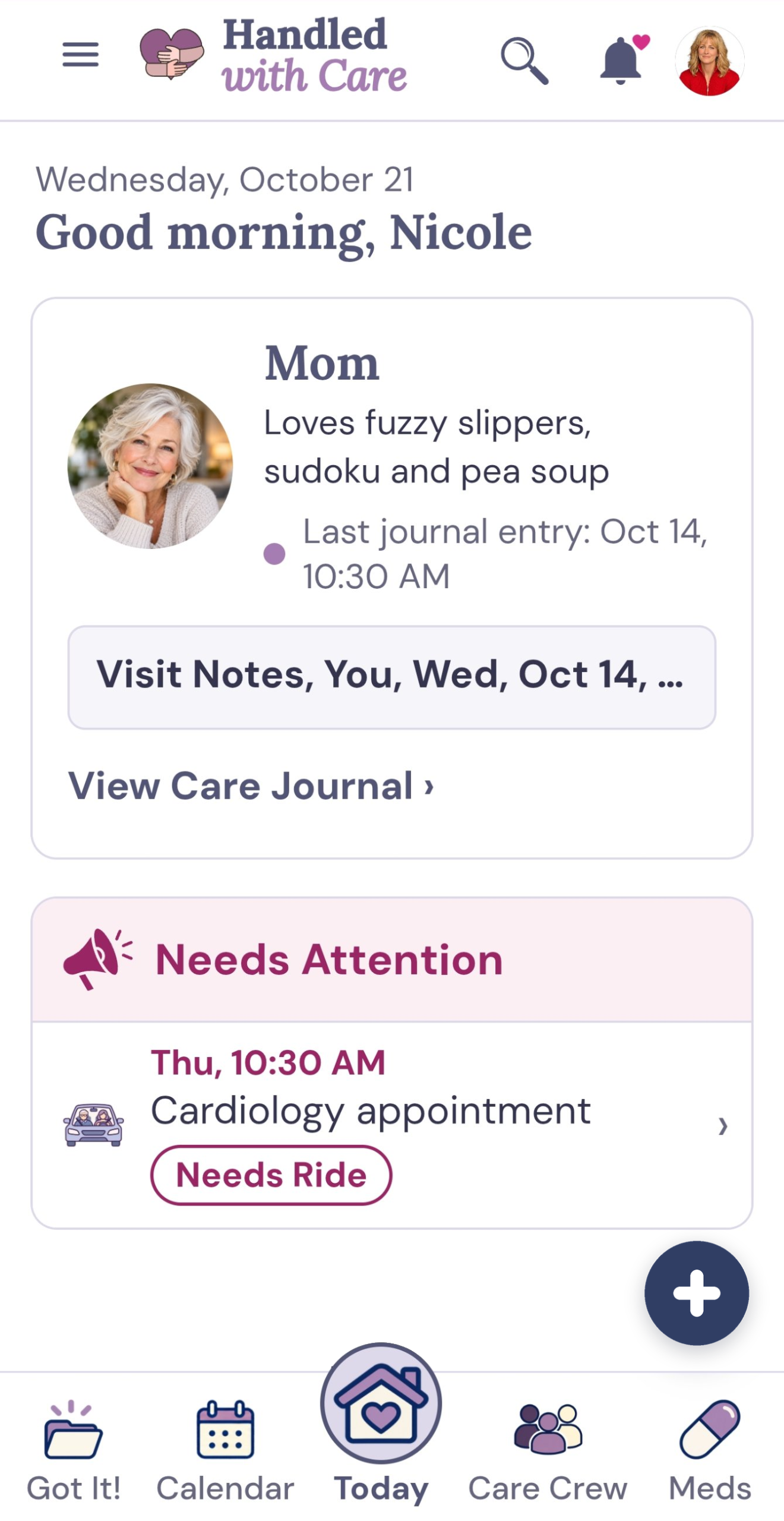
Any upcoming appointment without a driver shows Needs Ride.
Say “I’ve got it” in one tap.
Tap I Can Drive and everyone knows the ride is covered.
Walk in prepared.
Keep Questions to Ask, the Before You Go checklist, and the Care Summary with the appointment.
Know what to ask.
Since the Last Visit shows what’s changed and suggests questions you may want to ask.
Remember what the doctor said.
How Did It Go? keeps what the doctor said, new prescriptions, readings, and next steps.
Additional Details
Everything else, only when you need it.
Adding an appointment takes seconds. Sometimes there are other details you want to add. Just tap Additional Details and choose from:
Transportation: choose how they’re getting there, including asking the Care Crew for a ride.
Reminders: up to 3 per appointment, for just you, the driver or everyone in the Care Crew.
Repeat: for weekly visits like dialysis or physical therapy. With Manage Upcoming Dates, skip one date or change its time without redoing the whole series.
Priority: mark what really matters.
Let me know when this is done: flip the switch and you’ll get a notification when it’s finished.
Attachments and comments: keep the referral, paperwork and conversation with the appointment.
How to use it
Add an appointment to the caregiving calendar.
Tap the round + button, then choose Appointment.
Add what it is, the date and the time.
Tap Save. Stop here if you want. Or add transportation details.
Need a ride? Under Additional Details, set Transportation to ask the Care Crew. It shows Needs Ride until someone taps I Can Drive.
After the visit, answer How Did It Go?
How it works with the rest of the app
It connects to everything else.
For three days before the visit, Today prompts you to add anything you want to ask and saves it to Questions to Ask.
If a medical appointment within the week still has no ride, it shows under Needs Attention on Today, so it stays on everyone’s radar.
Readings from the visit go into Vitals History, so you can see the change over time.
With Premium, Connect Your Calendar App adds Care Crew appointments to your phone’s calendar so they show up where you already look.
How it’s different
Most calendars just show the appointment. Handled with Care also tracks the ride, shows who’s covering it, and keeps the important details from the visit.
I built it because I’ve seen too many families walk in missing information and walk out without a clear plan.
Common questions
You might be wondering.
Who can see our appointments?
Only your Care Crew can see them in the app. If you connect your phone’s calendar, share that link only with people you trust. Read more about privacy and control.
What if nobody can drive?
The appointment keeps showing Needs Ride until someone says yes, so it doesn’t slip through. You can also book a ride service and tap Mark Booked.
Does it work for repeat appointments?
Yes. Set it once with Repeat, then adjust single dates when life happens.
Can I find past appointments?
Yes. Search the calendar to find past appointments, then open one to see its visit notes.
Stop being the family switchboard.
Let the calendar do the asking.
Try It for Free